Today just simple tips from me..
Outlook
Instantly open a new e mail windows by double clicking on the empty background of an e mail folder such as the inbox.
Acrobat Reader
Hold down [Ctrl] + [space bar] to zoom in on your pdf document and [Ctrl] + [Alt] +[space bar] to zoom out.
Paintshop Pro
Using the shortcut combination of [Crtl]+[Shift]+[Z],you can open up a list of all the possible steps you can take for the 'cancel' function.
Excel
You can determine effective interest with 'EFFECTIVE' (Nominal interest,period) where'period' refers to the number of interest periods per annum.
Word
In ' View' mode,you can activate the mouse cursor to use in editing text by clicking on the magnifying glass symbol in the symbol toolbar.
Showing posts with label tips and tricks. Show all posts
Showing posts with label tips and tricks. Show all posts
Monday, January 4, 2010
Simple Tips,Make Its Easy For You
Labels:
tips and tricks,
Windows vista,
windows XP

Saturday, December 26, 2009
3 Firefox Tips You May Not Know About
Labels:
HACKING,
mozilla,
tips and tricks

The thing I like best about Firefox is that just when you think you know everything there is to know about the browser, something new comes along and surprises you.
I discovered five new Firefox tips today. Maybe these are old hat and you know them already. Or maybe like me, you had no idea these could be done.
1. Delete visited URL’s
When you drop down the box underneath the address bar, you can see your recent browsing history. But what if you want to remove one URL from that list? Maybe you’ve been looking at a naughty site and you don’t want your girfriend to know? Or maybe you’ve been shopping for your loved one online and you want to keep it a secret?
Just drop down the URL box, highlight the URL you want to zap then press the “delete” button on yourkeyboard. The URL will then be removed from the list.
2. Navigate to browser tabs using the keyboard
Instead of using the mouse to click on a tab, why not use the keyboard instead? Pressing CTRL + TAB together will bounce you from tab to tab, starting from the one in the far left and working its way along. Or if you want to go to a specifc tab straight away, you can do that too. CTRL + 2 will take you directly to the second tab from the left. CTRL + 5 will take you to the fifth tab from the left.
3. Grab files off webpages, even protected webpages
Have you ever wanted a picture, file or video off a webpage but you can’t, because it’s been protected? Just right-click on the page, choose “View Page Info” then the “media” tab. Find the file you’re looking for from the list and click on “save”. (note : this doesn’t work for everything but I have still had a pretty high success rate nonetheless).
Sunday, December 13, 2009
How to Rearrange your taskbar with Taskbar Shuffle in windows o.s
Labels:
tips and tricks,
Windows vista,
windows XP
Ever wished you could customize the programs on your Windows taskbar, like you can do with the tabs in Firefox?
Taskbar Shuffle makes it possible. Taskbar Shuffle is a tiny little free utility which once installed lets you drag and drop programs on your taskbar for quick reorganization. You can also have it automatically group similar program icons together under one umbrella button, or set it to group similar apps live side-by-side but never hidden.

Users can also use Taskbar Shuffle to set a middle-click close program feature for the mouse, and even the system tray function key, default to Control, can be altered to one of five others.
So if you want to do away with the chaotic placement of minimized programs on your taskbar, get Taskbar Shuffle.
Predator is a free tool that turns any USB flash drive into a key that you can use to lock or unlock your PC, preventing other people from gaining access to your computer in your absence.
Using Predator to protect your computer is both simple and fast. Just insert the drive you want to use and enter a password. Once it is running, use your PC as normal and then simply unplug the drive to lock it. Once it is removed, the keyboard and mouse are disabled and the screen darkens. No one will be able to use your computer. To unlock it, just reinsert the drive and keyboard and mouse are immediately released, and the display is restored.
Thursday, November 5, 2009
Pinstriped Cashmere Kindle Case Is So Very English
Labels:
tips and tricks

Now that the Kindle has ventured outside its home — the land of cowboys, blue jeans and beef — it seems that it should get a change of clothes. The Amazon-supplied leather jacket may make the e-reader look all cool and James Dean in its native land, but overseas we’re a little more conservative.
So it seems very fitting that the first English Kindle case to reach our inbox is a wool and cashmere pinstripe number, the very essence of the City Gent in protective rectangular form. It costs 22 Pounds Sterling ($36), and with its foam lining works as a protective slip case rather than mimicking a paper book’s cover like the official Kindle uniform. The maker, UK Wrappers, also offers a range of materials and designs, including a couple of tartans for Scottish Kindle owners, and a Paisley-lined number for the Irish.
It’s all very international, although I now feel that my Kindle is a little underdressed here in Spain. What should he wear, I wonder? Suggestions in the comments.
Tweaking your PC
Important tweaks:
• Boosting the speed of the system
1) Number of tweaks for the purpose
2) Many parts need to be tackled to get into the tweak
3) The CMOS or the start –up is the most important of this options
Tweaking the CMOS
This is one of the most sensitive parts of your computer. By changing setting here, you can gain very significant speed increases.
Step 1: Disable Bootup Floppy seek
Step 2: Enable CPU Internal cache
Step 3: Enable Video BIOS Shadow
Step 4: Enable System BIOS Cacheable
Step 5: Enable video BIOS cacheable
Step 6: Enable passive release
Step 7: Enable delayed transaction
Increasing the sped of the hard disk, CD/ DVD drives:
About drivers
1. They are software and let the card work with the rest of the system.
2. Ensure that they have the newest version
3. Especially for the sound card and the GFx card, they ensure maximum performance and speed
Upgrading the PC
Upgrading the Processor
In case of a Coppermine processor
• These are socket 370 based Intel processors.
• If your older board has such a socket you can easily upgrade
• If it does not support he Coppermine processor, you’ll have to upgrade th motherboard itself to a higher level
Upgrading the RAM
• This is essential even if the processor has been upgraded
• This is especially true of programs that require and use a lot or RAM
Upgrading the hard disk
• It improves the sped and performance of the system
• The hard disk essentially stores files
• Too much operation does not lend it to high quality performance
• Logically a larger hard disc takes care of these modifications
• Besides newer hard disks are faster by definition
Maintaining your PC for optimal performance
Does your computer shut down on it’s own?
• Check for loose power cables in sockets.
• The powers inside the system might be loose
The importance of earthing:
• Grounding one’s PC is very significant in fact it has to be done before anything else is done
• Ensure that the power cable has a ground wire
• This ensures the stray voltage charges do not leak in to the system
• One indication of this situation is if one experiences a slight shock if they touch the system
Keeping the system clean: Inside out
• Servicing the computer is a necessity
• Certain parts require special attention
• The cooling fans on the system and iun the CPU are 2 such things
• If they stop is could be bad for the system
• The average frequency with which this should be done is between 3 – 6 months
Important tweaks:
• Boosting the speed of the system
1) Number of tweaks for the purpose
2) Many parts need to be tackled to get into the tweak
3) The CMOS or the start –up is the most important of this options
Tweaking the CMOS
This is one of the most sensitive parts of your computer. By changing setting here, you can gain very significant speed increases.
Step 1: Disable Bootup Floppy seek
Step 2: Enable CPU Internal cache
Step 3: Enable Video BIOS Shadow
Step 4: Enable System BIOS Cacheable
Step 5: Enable video BIOS cacheable
Step 6: Enable passive release
Step 7: Enable delayed transaction
Increasing the sped of the hard disk, CD/ DVD drives:
About drivers
1. They are software and let the card work with the rest of the system.
2. Ensure that they have the newest version
3. Especially for the sound card and the GFx card, they ensure maximum performance and speed
Upgrading the PC
Upgrading the Processor
In case of a Coppermine processor
• These are socket 370 based Intel processors.
• If your older board has such a socket you can easily upgrade
• If it does not support he Coppermine processor, you’ll have to upgrade th motherboard itself to a higher level
Upgrading the RAM
• This is essential even if the processor has been upgraded
• This is especially true of programs that require and use a lot or RAM
Upgrading the hard disk
• It improves the sped and performance of the system
• The hard disk essentially stores files
• Too much operation does not lend it to high quality performance
• Logically a larger hard disc takes care of these modifications
• Besides newer hard disks are faster by definition
Maintaining your PC for optimal performance
Does your computer shut down on it’s own?
• Check for loose power cables in sockets.
• The powers inside the system might be loose
The importance of earthing:
• Grounding one’s PC is very significant in fact it has to be done before anything else is done
• Ensure that the power cable has a ground wire
• This ensures the stray voltage charges do not leak in to the system
• One indication of this situation is if one experiences a slight shock if they touch the system
Keeping the system clean: Inside out
• Servicing the computer is a necessity
• Certain parts require special attention
• The cooling fans on the system and iun the CPU are 2 such things
• If they stop is could be bad for the system
• The average frequency with which this should be done is between 3 – 6 months
MS PowerPoint is a powerful and attractive tool to express your ideas to others. You can convey these ideas in more effective ways, if you are using movie files with your simple slides. The Flash movies are normally the best choice to add into PowerPoint due to its small file size.
Follow the given steps to insert the Flash Movies into PowerPoint Slides:
Make sure before inserting the Flash Movies into PowerPoint slides that you have installed the Flash Player on your computer.
First of all open the presentation in which you want to insert Flash movie file.
Now click on "Toolbar" option from the "View" menu and choose the option "Control Toolbox".

Here a small floating menu will appear with the title "Control Toolbox".

Using "Control Toolbox" toolbar, click on the icon that looks like hammer for more controls and scrolling the objects then choose the object "Shockwave Flash Object".

Now using your mouse pointer, draw the box size and position where you want to play a flash movie.
Now right click on box and select the "Properties" option.

A small properties dialog box will appear with different options.
Under the Alphabetic tab, click the option "Movie" and type the full file path of flash movie in blank cell next to Movie (for example d:\flash_file).

Again under same tab, set the property "True" for "Playing" and "EmbedMovie" objects to add and play the flash file automatically with slide. Here you can also set the Quality, Width, Scale and Windows Mode objects for flash file.
Finally close the "Properties" dialog box. Save your PowerPoint presentation and run it for test.
Follow the given steps to insert the Flash Movies into PowerPoint Slides:
Make sure before inserting the Flash Movies into PowerPoint slides that you have installed the Flash Player on your computer.
First of all open the presentation in which you want to insert Flash movie file.
Now click on "Toolbar" option from the "View" menu and choose the option "Control Toolbox".

Here a small floating menu will appear with the title "Control Toolbox".

Using "Control Toolbox" toolbar, click on the icon that looks like hammer for more controls and scrolling the objects then choose the object "Shockwave Flash Object".

Now using your mouse pointer, draw the box size and position where you want to play a flash movie.
Now right click on box and select the "Properties" option.

A small properties dialog box will appear with different options.
Under the Alphabetic tab, click the option "Movie" and type the full file path of flash movie in blank cell next to Movie (for example d:\flash_file).

Again under same tab, set the property "True" for "Playing" and "EmbedMovie" objects to add and play the flash file automatically with slide. Here you can also set the Quality, Width, Scale and Windows Mode objects for flash file.
Finally close the "Properties" dialog box. Save your PowerPoint presentation and run it for test.
MICROSOFTS COMPUTER DICTIONARY

Every device connected to the public Internet is assigned a unique number known as an Internet Protocol (IP) address. IP addresses consist of four numbers separated by periods (also called a 'dotted-quad') and look something like 127.0.0.1.
Since these numbers are usually assigned to internet service providers within region-based blocks, an IP address can often be used to identify the region or country from which a computer is connecting to the Internet. An IP address can sometimes be used to show the user's general location.
Because the numbers may be tedious to deal with, an IP address may also be assigned to a Host name, which is sometimes easier to remember. Hostnames may be looked up to find IP addresses, and vice-versa. At one time ISPs issued one IP address to each user. These are called static IP addresses. Because there is a limited number of IP addresses and with increased usage of the internet ISPs now issue IP addresses in a dynamic fashion out of a pool of IP addresses (Using DHCP). These are referred to as dynamic IP addresses. This also limits the ability of the user to host websites, mail servers, ftp servers, etc. In addition to users connecting to the internet, with virtual hosting, a single machine can act like multiple machines (with multiple domain names and IP addresses).

Now your system mouse was disconnect or hanged what we do?
There are many ways to manage that problem, suddenly restart your computer, or use shortcut keys on your keyboard.
if we don't know the “shortcut key” and not possible to restart, because here running program cannot be saved. Now what we do?
simply follow this given steps!
Press win button on your keyboard go to settings>go control panel>select accessibility option >select mouse tab with the help of tab button>select use mouse key option tick the check box with the help of space button>select Apply and ok

Now press 1,2,3,4,6,7,8,9 for cursor moving
Now press 5 for Enter.
try right side number on your keyboard, Now your cursor will simply moving on your desktop, now continue your job and save your valuable time.
This option is only for emergency purpose
Download keyboard shortcut in xls
Download Mozilla shorcut in xls
Now I am going to show some fun notepad tricks. Enjoy these cool tricks.
Trick – 1
How to get fake error message like below.
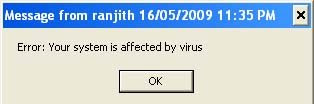
Open Notepad >
Type> msg * Error: Your system is affected by virus
Save> “virus.bat”
Now open that .bat file, now you got error message window
Its not virus, just your assumption message.
Trick-2
How to see your system time and date on notepad.
Open notepad>
Type> .LOG
Save> time.txt
Now open that text file, your system time and date is appear on notepad.
Another way to watch time and date in notepad.
Open notepad>
Press> F5 button on your keyboard
Now display time and date on your notepad.
Trick-3
How to test your antivirus software is active or non active.
Open notepad>
Copy above code and paste to the notepad and save “filename.txt”
X5O!P%@AP[4\PZX54(P^)7CC)7}$EICAR-STANDARD-ANTIVIRUS-TEST-FILE!$H+H*
Now scan that text file on your virus scanner, it shows the text file as virus, your antivirus software is done; otherwise your antivirus software is non active.
Trick -4
Open notepad>
Type> this app can break
Save “break.txt”
Now open that txt file see miracle.
Trick -5
Immediately you want 50 pages text in msword?
Open Microsoft word>
Type> =rand(100,100) and hit enter
Now 100 lines with 100 paragraphs are ready
The quick brown fox jumps over the lazy dog. Watch these sentences A to Z all alphabetic are present.
Enjoy these steps have a nice day....
Trick – 1
How to get fake error message like below.

Open Notepad >
Type> msg * Error: Your system is affected by virus
Save> “virus.bat”
Now open that .bat file, now you got error message window
Its not virus, just your assumption message.
Trick-2
How to see your system time and date on notepad.
Open notepad>
Type> .LOG
Save> time.txt
Now open that text file, your system time and date is appear on notepad.
Another way to watch time and date in notepad.
Open notepad>
Press> F5 button on your keyboard
Now display time and date on your notepad.
Trick-3
How to test your antivirus software is active or non active.
Open notepad>
Copy above code and paste to the notepad and save “filename.txt”
X5O!P%@AP[4\PZX54(P^)7CC)7}$EICAR-STANDARD-ANTIVIRUS-TEST-FILE!$H+H*
Now scan that text file on your virus scanner, it shows the text file as virus, your antivirus software is done; otherwise your antivirus software is non active.
Trick -4
Open notepad>
Type> this app can break
Save “break.txt”
Now open that txt file see miracle.
Trick -5
Immediately you want 50 pages text in msword?
Open Microsoft word>
Type> =rand(100,100) and hit enter
Now 100 lines with 100 paragraphs are ready
The quick brown fox jumps over the lazy dog. Watch these sentences A to Z all alphabetic are present.
Enjoy these steps have a nice day....

Many people have struggle in typing because they don’t know how to finger on keyboard so we spend lot of time to make a document.
Here typing master solve that problem, typing master is nothing it’s a small software for typing training they teach lessons for your typing skill.
Now start download typing master and get ready to learn.
Click here to download typing master
For more details visit www.typingmaster.com
It’s one of the ways to improve your typing skill.
have a nice day...
What would you do if your cell phone is running out of power. You need it on, but there’s not a power outlet in sight. The answer is simple, If you’ve got a charger and USB cable to spare, you can make your own cell phone charger in 15 minutes! The method works with most phones that have a 3.6 Volt Li-ion battery (this is usually mentioned on the battery itself), but still may not work with some, so make sure it’s a spare charger you’re using.
Most phones will work for this trick but there are supposedly cell phones out there that wouldn’t work— requiring greater current than the USB port can deliver—but these should be very few, and you’d be really unlucky to have ended up with one.
know the USB

The two extremes (pins 4 and 1from left to right) are the ones I am after—they’re the negative and positive terminals for USB power respectively. Pins 2 and 3 are for data.
Hack ‘Em Up

Use a wire cutter or just a blade to cut and open up both the charger and USB cable. The red and black wires in theUSB cable are what we’re concerned with—the white and green are for data, so don’t bother with those. Your charger should have red and black wires too—I know of none that wouldn’t have the colour-coding, but you never know.
Making Ends Meet

You’ve probably guessed this now—join the two red wires and the two black wires. If you have access to one, use a soldering iron and secure the connections using solder. This will keep it intact even if you use it a bit roughly. Insulate them from each other using electrical tape (extremely important), and you’re done!
Testing..

Voila! It works! The next time you have a battery emergency, just leech power off your laptop and make that all important call!
 Yahoo Messenger trick-How to open Multiple Yahoo Messenger???1. Go to start > Run > Type regedit > Press Enter2. Click on the plus sign near the folder HKEY_CURRENT_USER3. Click on the plus sign near the folder Software4. Click on the plus sign near the folder Yahoo5. Click on the plus sign near the folder Pager6. Right Click on the folder name Test > New > DWORD Value7. Right side you will get a file named New Value #18. Right Click on the file New Value #1 and Rename it as Plural and press enter9. Double Click on the file Plural10. You will get a windown named Edit DWORD Value11. Type 1 inside 'Select the Value data' and press enter12. Close the registery editor window13. Now you can launch multiple windows and use different ID'sEnjoy
Saturday, October 3, 2009
How To Score Clear All Subjects And Score Good Marks In Jntu External Exams
Labels:
tips and tricks
Hai.., First Year's (Jntu).. Here Is A Small Message To U..
Hai,First Year's..
My Dear Brother's & Sister's..
Here Is Small Message To U~
5 Best Suggestion's To Clear All Subject's At A Time,
Not Only To Clear But For Also For Better Scoring.
1.Sit For 3 Hours In Exam Hall And Write Minimum For 2 & 1/2 Hours.
2.Attempt All The 5 Questions,
Either U Know Or Not.
(First Fill Up The Known Question's And Next Answer For Unknown Question's)
3.Just Try To Fill Up The BookLet Given To U and Also Try To Attach 1 Additional To Ur Answer BookLet,
4.Put As Many Headding's And Side Hedding's U Can,
(Use 2-3 Types Of Colour's{Sketch's} To Impress And Try To Present In Good And Attractive Manner).
5.Try To Wear More Daigram's (Circuit's, Tabular Coloumn's, & Etc.)
Friend's,These r the main points to remember(For To Get Good Marks In Ur Coming Exams).
K,First Years..,Take Care & Study Well..
Best Of Luck For Ur Exams.,
Hope U Get Good Result..
k, Take Care, Bye..
Hai,First Year's..
My Dear Brother's & Sister's..
Here Is Small Message To U~
5 Best Suggestion's To Clear All Subject's At A Time,
Not Only To Clear But For Also For Better Scoring.
1.Sit For 3 Hours In Exam Hall And Write Minimum For 2 & 1/2 Hours.
2.Attempt All The 5 Questions,
Either U Know Or Not.
(First Fill Up The Known Question's And Next Answer For Unknown Question's)
3.Just Try To Fill Up The BookLet Given To U and Also Try To Attach 1 Additional To Ur Answer BookLet,
4.Put As Many Headding's And Side Hedding's U Can,
(Use 2-3 Types Of Colour's{Sketch's} To Impress And Try To Present In Good And Attractive Manner).
5.Try To Wear More Daigram's (Circuit's, Tabular Coloumn's, & Etc.)
Friend's,These r the main points to remember(For To Get Good Marks In Ur Coming Exams).
K,First Years..,Take Care & Study Well..
Best Of Luck For Ur Exams.,
Hope U Get Good Result..
k, Take Care, Bye..
Most of us don’t pay much attention to the RAM we buy — big mistake!
Memory is one component that has seen an alarming surge in its use over the past two years. Applications have suddenly become memory intensive and a couple of years back you could get along fine with 512 MB of RAM; these days we’re seeing even PCs equipped with 1 GB of RAM staggering to meet requirements. Inside your PC, RAM is one of the most important components besides your processor and graphics solution. In fact in many cases RAM is as important as your CPU, simply because the fastest CPU coupled with a meagre amount of RAM will end by bottlenecking performance.
For a reasonably mid-range computer, a simple upgrade to the memory subsystem, say an upping of system RAM from 1 GB to 2 GB, could see an increase in performance of more than 40 per cent in some cases, although this largely depends on the application being used. If you already have a Core 2 Duo processor in the speed range of 2.4 GHz and one GB of RAM, you are better off upgrading to two GB of RAM, rather than changing over to a 3.0 GHz Core 2 Duo. Obviously you would get a performance hike in both cases but in the case of upgrading your RAM this would be more pronounced.
DDR SD RAM is history and has been for some time. DDR2 memory is the norm these days and prices have dropped dramatically. In fact DDR2 RAM is so cheap that you can pick up a four GB kit for a ridiculous amount. Earlier DDR2 533 MHz and 667 MHz was the norm; but you would be hard pressed to find either in the market today. DDR2 800 MHz memory is what is the norm for desktops today and this is widely available. DDR2 1066 MHz memory is still reserved for enthusiasts, although two and four GB kits are available. A two GB kit of DDR2 1066 MHz memory is available for Rs 8,000 to Rs 10,000 from brands like Corsair, Kingston, OCZ and Transcend. 1 GB of DDR2 800 MHz memory costs approximately Rs 1,000, which means a 4 GB, dual channel kit would cost you Rs 4,000. You may pay a little extra for higher density 2 GB sticks, and a 2 x 2 GB, DDR2 800 MHz configuration would come to Rs 4,500. The four above mentioned brands are the biggest players in India, although brands like GSkill and AData are also available from certain vendors.
From the prices it would seem now’s the time to swoop in and swallow a four GB kit. Normally it would be, but there’s one problem looming ahead; Intel, with its considerable sway in the way of things with desktop computers has decided to move to DDR3 for its new platform based around the upcoming Nehalem processors. This is an important consideration even if you do not plan to adopt Nehalem straightaway because this is exactly what happened to DDR memory. Intel decided that DDR2 would benefit performance on Intel based systems more than DDR, and despite AMD’s protests, DDR had to go. As of now, both the latest Phenom and Yorkfield processors from AMD and Intel (respectively) support DDR2 but if Nehalem picks up sales within the next six months, the price of DDR2 could rise with it; owing to scarcity as manufacturers stop making it.
Now you’re faced with an interesting dilemma. Do you stock up on DDR2 now, in the hope that your PC will last for another two to three years without needing DDR3? Or do you spend big and invest in DDR3 right now, and wait for Nehalem platforms and CPUs to become more affordable? DDR3 is costly right now; and a 4 GB kit of 1,333 MHz DDR3 could easily set you back by Rs 15,000 or so. Faster kits in the range of 1,600 MHz are available from Corsair, OCZ and Kingston, but such kits cost in excess of Rs 20,000. With the way memory is being used, it also doesn’t make sense to buy 2 GB anymore, as 64-bit operating systems are the future and these will need at least 4 GB. Also DDR3 shows performance increments over fast DDR2 at speeds of 1,600 MHz and greater; this is because DDR3 is plagued with higher latencies at lower speeds.
My advice is to wait. If you have a Core 2 Duo, or AMD Phenom based PC with 2 GB of memory, hold your horses for another six months. Samsung, Hynix and Qimonda have promised DDR3 2000 and DDR3 2200 MHz memory, which will mean slower clocked memory will become cheaper next year. Do not buy 4 GB of DDR2 today, unless you’re sure you will not adopt Nehalem or any other new DDR3 based platform for another 18 months. Only if you absolutely cannot wait and have a budget should you buy DDR3 now. Six months down the line, prices may halve and make your costly investment seem worthless.
How to get a free rapidshare premium account

I get lots of emails daiy asking me "How to get a premium account for free in rapidshare" or "How to get a free rapidshare premium account"Well today i will show you How to get a a rapidshare premium accounts for free.
Rapidshare,Megaupload,Mediafire etc, has become one of the most famous file sharing networks.But unfortunately most of these file sharing sites have a premium area and the services from the free area are not good.But investing for the premium account for these sites are not really possible for us.So here in this blog i am listing some sites from which you can download like a premium user without investing a dime.These sites are known as Premium Link generators and they offer you to download without any restrictions and also you get full download speed,full download accelerator support and also resume facilities which are totally absent in the free scheme of the file sharing sites.So without wasting any time lets go to business.
Free Rapidshare Premium link generator:
Free rapidshare premium link generator help in generating rapidshare premium links without asking for any money. So, even though you don’t have rapidshare premium account, you are able to download rapidshare files at high speed just like Rapidshare premium users. So, i have mentioned below many free rapidshare premium link generator sites to help you download rapidshare files at high speed.
1. Rslinkgens.info
This is a free premium link generator site.The sites which Rslinkgens.info supports are:-
1.Rapidshare.com
2.megaupload.com
3.Easyshare.com
4.gigasize.com.
Limitation:Maximum: 6 files per day Last test: 24/05/2009 Status: Working Limit: 220 mb
2.FastnFree4u.net
This is also a premium link generator site.The sites which fastnfree4u.net supports are:-
1.Rapidshare.com
2.Megaupload.com
3. Nbe-media.net
The sites which Nbe-media.net supports are :-
1.Rapidshare.com
2.Megaupload.com
For all of you who like my post please comment and also leave any premium link generators that you know of.I Am Also Proving a screenshot of a download from these sites which support resume and pause facilities like premium accounts.
There are some more rapidshare premium link generators to get a free rapidshare premium accounts.
1. RsFox.com
2. Oopar.com
3. Rapidshare premium link generator
4. Rapidfile.us
5. Fire Premiums
6. Rapidcheat.com
7. Free Rapid
8. Premium4Free
9. Rapidshare Premium Link Generator
10. Rapidshare premium links
Just check out these free rapidshare premium link generator sites to get rapidshare premium account benefits. If you know any other free rapidshare premium link generator sites, please help others by mentioning those rapidshare premium link generator sites in comments.
I get lots of emails daiy asking me "How to get a premium account for free in rapidshare" or "How to get a free rapidshare premium account"Well today i will show you How to get a a rapidshare premium accounts for free.
Rapidshare,Megaupload,Mediafire etc, has become one of the most famous file sharing networks.But unfortunately most of these file sharing sites have a premium area and the services from the free area are not good.But investing for the premium account for these sites are not really possible for us.So here in this blog i am listing some sites from which you can download like a premium user without investing a dime.These sites are known as Premium Link generators and they offer you to download without any restrictions and also you get full download speed,full download accelerator support and also resume facilities which are totally absent in the free scheme of the file sharing sites.So without wasting any time lets go to business.
Free Rapidshare Premium link generator:
Free rapidshare premium link generator help in generating rapidshare premium links without asking for any money. So, even though you don’t have rapidshare premium account, you are able to download rapidshare files at high speed just like Rapidshare premium users. So, i have mentioned below many free rapidshare premium link generator sites to help you download rapidshare files at high speed.
1. Rslinkgens.info
This is a free premium link generator site.The sites which Rslinkgens.info supports are:-
1.Rapidshare.com
2.megaupload.com
3.Easyshare.com
4.gigasize.com.
Limitation:Maximum: 6 files per day Last test: 24/05/2009 Status: Working Limit: 220 mb
2.FastnFree4u.net
This is also a premium link generator site.The sites which fastnfree4u.net supports are:-
1.Rapidshare.com
2.Megaupload.com
3. Nbe-media.net
The sites which Nbe-media.net supports are :-
1.Rapidshare.com
2.Megaupload.com
For all of you who like my post please comment and also leave any premium link generators that you know of.I Am Also Proving a screenshot of a download from these sites which support resume and pause facilities like premium accounts.
There are some more rapidshare premium link generators to get a free rapidshare premium accounts.
1. RsFox.com
2. Oopar.com
3. Rapidshare premium link generator
4. Rapidfile.us
5. Fire Premiums
6. Rapidcheat.com
7. Free Rapid
8. Premium4Free
9. Rapidshare Premium Link Generator
10. Rapidshare premium links
Just check out these free rapidshare premium link generator sites to get rapidshare premium account benefits. If you know any other free rapidshare premium link generator sites, please help others by mentioning those rapidshare premium link generator sites in comments.
Subscribe to:
Posts (Atom)